
Invoice in two minutes. Know who owes you.
Save a client once, bill them forever. Send a branded PDF and watch it go sent → viewed → paid — no spreadsheet, no guessing.
- to send an invoice
- ~2 min
- branded templates
- 5
- spreadsheets to update
- 0
- a month, 7 days free
- $14
Built for one
If your own name is on the invoice, it's for you.
Not for you if you manage staff, run payroll, or need a full accounting ledger.
Freelance designer
Projects + a retainerThree project invoices, and a retainer drafted on the 1st.
Developer or consultant
Hours × rate12 hrs at $100/hr — the client's details fill themselves in.
One-person studio
Fixed-fee phasesPhase 2 of 3 sent. Phase 1 already paid.
Coach or writer
PackagesSession packages billed monthly, each client in their own currency.
A typical invoice, start to finish
The template was never the slow part.
About 25 minutes by hand, about 2 with One Person. Finding their address, guessing the number, checking who paid — that's the real 25 minutes. One Person does that part for you.
By hand
- Hunt for the client's billing details
- Copy last month's file, edit every field
- Guess the next invoice number
- Export a PDF, attach it, write the email
- Update the tracking spreadsheet
- Check, weeks later, whether it was paid
With One Person
- Pick the client — their details fill in
- Add line items, the total updates live
- Numbering is automatic
- Send a branded A4 PDF from the app
- Overdue flags itself after the due date
- One screen shows everything still owed
How it works
From blank page
to paid, in four moves.
- 01 / 04
Save the client once.
Name, address, tax ID, currency and private notes. Every invoice you send them fills itself in.
- 02 / 04
Build the invoice.
Pick one of five templates with your logo and colours. Add line items — totals, tax and numbering take care of themselves.
- 03 / 04
Send it, or schedule it.
Email a print-ready A4 PDF or share a private link. Pick a send date, or repeat it weekly, monthly or yearly.
- 04 / 04
Get paid, and know it.
Past the due date, an invoice marks itself overdue. Mark it paid and your dashboard catches up.
A client book
Billing details, currency, notes and what each client has paid you to date.
Five templates
Your logo, colours and signature, a live editor, and a print-ready A4 PDF.
Overdue, automatically
Status changes itself the day a due date passes. No spreadsheet to check.
Recurring and scheduled
Repeat weekly to yearly, or choose the day an invoice goes out.
Any currency
Each client is billed in their own currency, with your tax defaults applied.
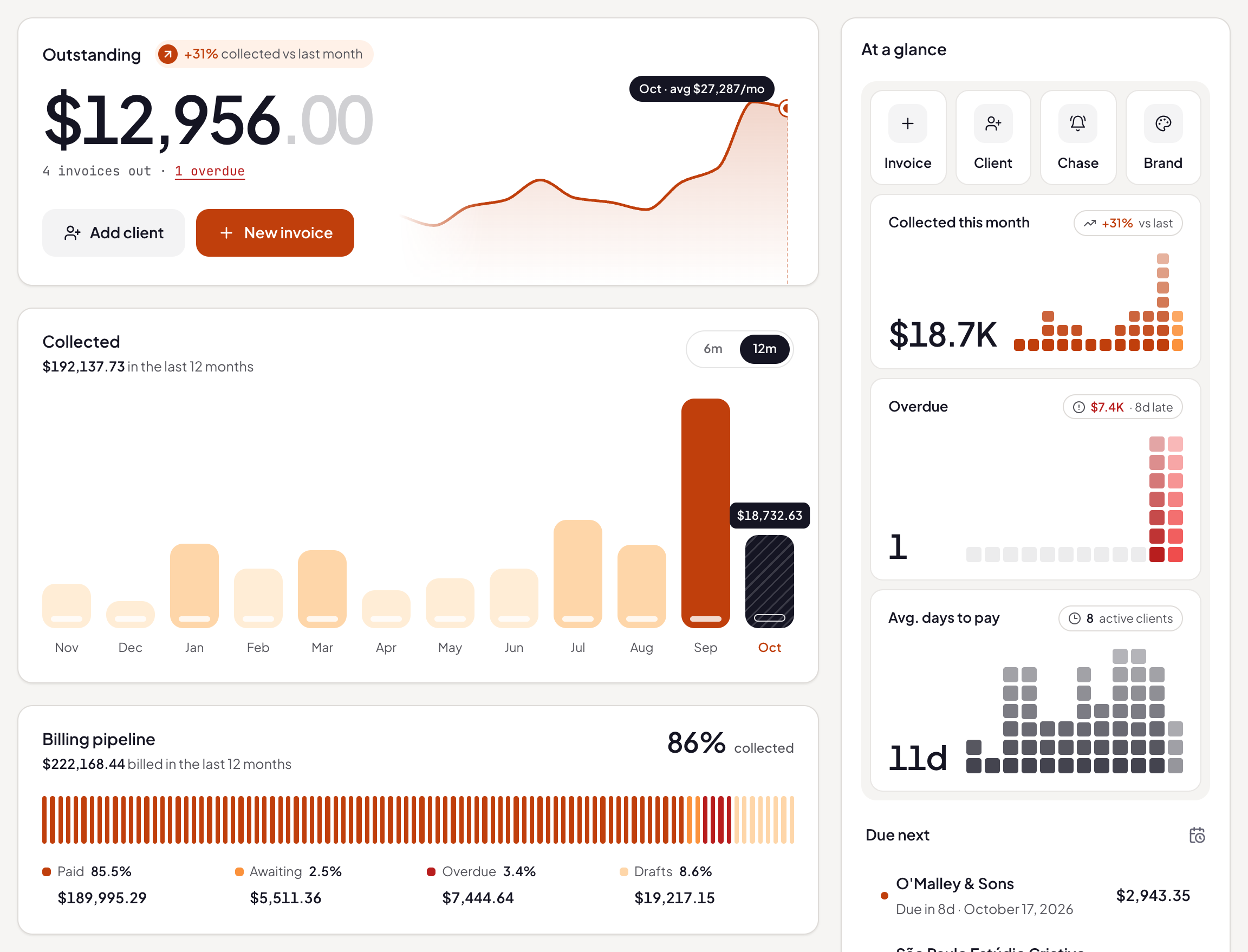
One clear dashboard
What's outstanding, what was collected each month, and your top clients.
Pricing
Pay monthly.
Or pay once.
Seven days free with everything unlocked. Cancel or export anytime.
Lifetime
$149once
About eleven months of Monthly — then it's yours for good, including Proposals and Projects when they ship.
Start free, choose Lifetime laterBoth plans include
- Unlimited clients and invoices
- All five templates, with your branding
- Overdue tracking and a live dashboard
- Recurring and scheduled invoices
- PDF by email, or a private link
- Export your data anytime
From the founder
Built by one person, for people who work alone.
I built One Person because I was running my own business out of a Word template and a spreadsheet, and I was tired of not knowing who owed me money.
It's early — you'd be one of the first people using it, with a direct line to me about what gets built next.
Questions
Straight answers.
What exactly does One Person do?
Two things, joined together: it stores your clients (address, tax ID, currency, notes) and it creates and tracks invoices for them. Save a client once, and every invoice you send them is pre-filled. Send it as a branded PDF or a private link, and see at a glance what's sent, overdue and paid.
Do I need a card to try it?
No. Sign up and you get seven days with everything unlocked. You only choose a plan — monthly or lifetime — if you decide to keep using it.
I already use a Word template. Why switch?
The template was never the slow part — finding the client's details is, remembering the invoice number is, and knowing who hasn't paid is. If you send one invoice a year, keep the template. If you send a few a month, this turns roughly 25 minutes into about 2.
Does it handle different currencies and tax?
Yes. Each client keeps their own currency, and your tax defaults are applied to every invoice you create. It doesn't file taxes for you — it makes sure each invoice is right.
Is this accounting software?
No, and deliberately so. There's no payroll, no double-entry ledger, no tax filing. It covers getting paid — invoicing your clients and tracking the money. If you need full books, keep your accountant; this sits happily alongside them.
Can I take my data with me?
Yes. Export your clients and invoices from your account settings at any time, and delete your account whenever you want.
How does pricing work?
Seven days free with everything unlocked. After that it's $14/month, or a single $149 payment for lifetime access — including Proposals and Projects when they ship. Cancel anytime.
Your next invoice
could take two minutes.
7 days free · then $14/mo or $149 once